An action is a decision you want made, defined in plain language: "should this bank transfer be held?", "should this merchant be approved?". You define it once, and then ask for a decision each time it comes up. There are no rules to write by hand and no features to engineer: you say what you are afraid of, and the policy on top is yours, and exact.
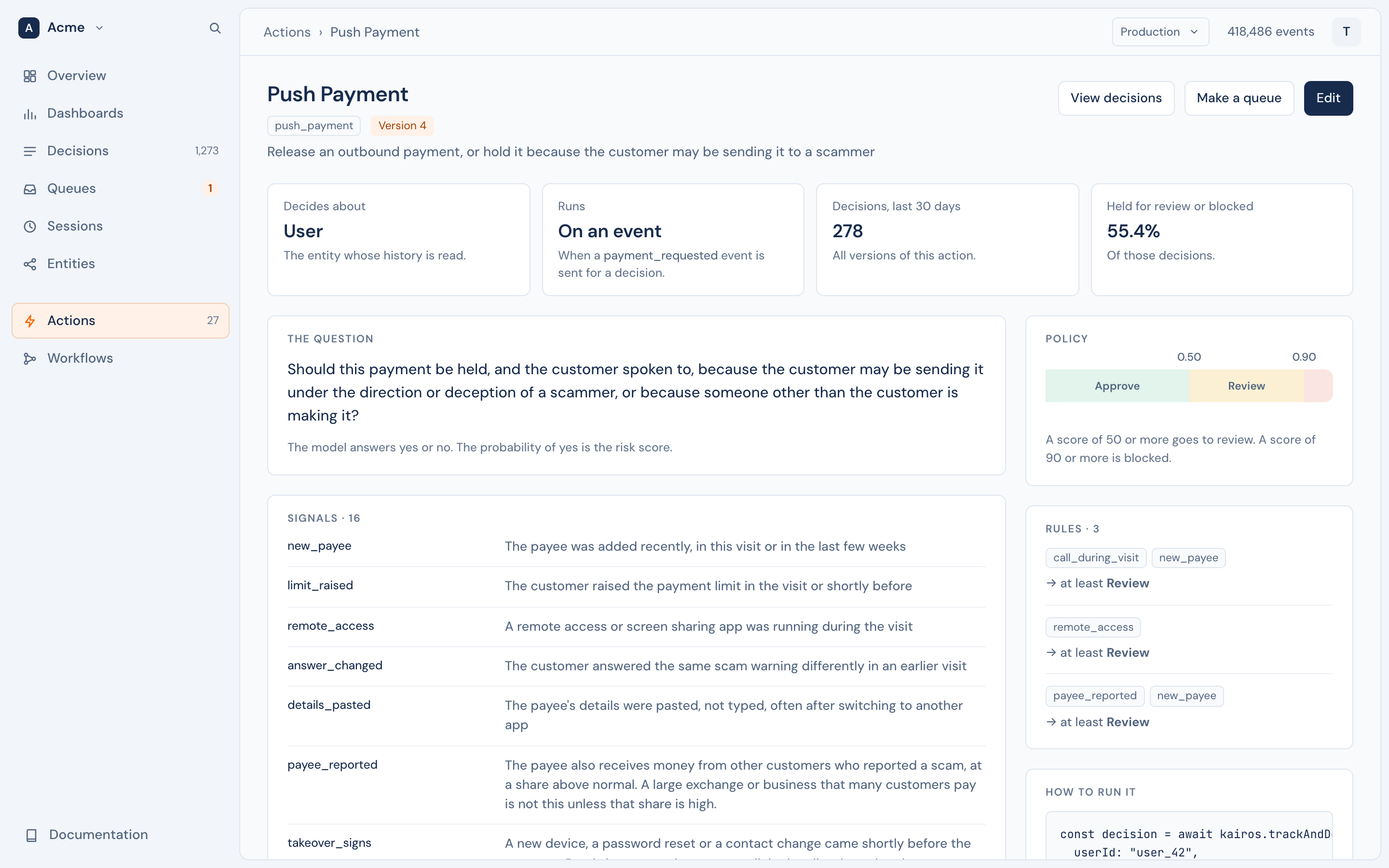
An action has a key, such as bank_transfer, that your code uses, and a display name, such as "Bank Transfer", that people see.
Define an action#
await kairos.defineAction("bank_transfer", {
  displayName: "Bank Transfer",
  subject: "user",
  hold: "Should this transfer be held because the account shows signs of fraud, takeover or being used to pass on other people's money?",
  reasons: {
    new_device: "The request comes from a device the user has not used before",
    new_payee: "The money goes to a payee added shortly before the request",
  },
  typologies: {
    legit: "An ordinary payment by the owner of the account",
    account_takeover: "Someone who is not the owner is using the account",
    mule: "The account receives money from other people and passes it on",
  },
  policy: { block: 0.9, review: 0.5 },
});kairos.define_action("bank_transfer", {
"displayName": "Bank Transfer",
"subject": "user",
"hold": "Should this transfer be held because the account shows signs of fraud, takeover or being used to pass on other people's money?",
"reasons": {"new_device": "The request comes from a device the user has not used before"},
})defineAction is safe to call each time your service starts: the same definition changes nothing. In the console, Actions › New action starts from a blank form or from one of the templates. With the API, it is PUT /v1/actions/:name.
The fields#
| Field | ||
|---|---|---|
subject |
required | The entity type the decision is about, such as user or merchant. Its history is what the model reads. |
hold |
required | One yes-or-no question. Yes must mean "hold". The model's probability of yes is the risk. |
reasons |
Signals to look for, as code → description. Each is judged on its own, and the ones found come back with the decision. | |
typologies |
Explanations that exclude each other, as code → description. The most likely one comes back. | |
policy |
How the answers become an outcome. See Policy. | |
trigger |
An event type that starts the action. See How an action runs. | |
automatic |
With a trigger: decide each matching event in the background. |
|
context |
What the model is shown, beyond the defaults: recent events, totals, link types. | |
displayName, description |
For people. The model does not see them. |
Write the question#
- Yes must mean "hold". "Should this transfer be held because …?", not "Is this transfer safe?".
- Name what you are afraid of. "…because the account shows signs of account takeover, of money mule activity, or of the customer being a scam victim" works better than "…because it is risky".
- Name the action. "the pending bank transfer", so that the model does not confuse it with earlier transfers in the history.
Signals and typologies#
The model never sees the codes, only the descriptions. new_device tells it nothing; "The current session uses a device that the account did not use before" tells it everything.
- Reasons are independent. Write one fact per reason; several can be true at once.
- Typologies are the opposite: exactly one is chosen, so make them exclusive, and include one for "nothing wrong". Without it, the model must pick a bad explanation for a good customer.
- Give each list at least two entries.
Policy#
The model answers with probabilities. The policy turns them into one of four outcomes, in order of severity: approve, step_up, review, block.
"policy": {
  "block": 0.9,
  "review": 0.5,
  "rules": [
    { "id": "new_device_and_payee", "allOf": ["new_device", "new_payee"], "outcome": "step_up" },
    { "id": "drained", "when": [{ "total": "money_out", "op": ">=", "value": 5000 }], "outcome": "review" }
  ]
}- Thresholds. A hold probability at or above
blockis block, at or abovereviewis review, otherwise approve. - Rules. A rule fires when every reason in
allOfis present, and every comparison inwhenholds. A rule can only make the outcome more severe, never less.step_upcomes only from a rule.
The server makes the comparisons, so a rule is exact every time. The default thresholds, 0.9 and 0.5, are placeholders: hard cases often score well below 0.5 while still ranking above normal ones. Set them from your own outcomes with a backtest.
Totals#
A model reads one number well and adds up fifty badly. So an action can ask the server to calculate totals over the subject's events, and to make the comparison:
"context": {
  "totals": [
    { "name": "money_in", "event": "deposit", "sum": "usd", "window": "7d", "usual": "90d", "covers": "usd" }
  ]
}
The model then reads "money in during the last 7 days: 9,000 from 2 events, 34.2 times a usual week, and it covers all of this withdrawal". A total has a period (30m, 24h, 7d, session, or all history), optional conditions in where, a comparison with the usual period in usual, and the share of the request it covers in covers. Totals read every event in their period, so they are also how old history reaches a decision.
Pair a total with a rule. A total makes the model report the right signals, but the outcome changes when a rule acts on it, for example { "total": "money_in", "is": "times_usual", "op": ">=", "value": 10 }. Totals are facts for a judgement, not a balance check: check the balance in your ledger.
Context options#
| Option | Default | |
|---|---|---|
recentEvents |
30 | How many of the subject's most recent events the model sees in full, 1 to 500. |
reasonThreshold |
0.5 | A reason comes back when its probability is at or above this. |
linkTypes |
every type that links | The entity types that count as links. |
totals |
none | Up to 8. See Totals. |
How an action runs#
| In the console | How |
|---|---|
| On request | Your server calls decide when the action comes up. |
| On an event | The action has a trigger, such as bank_transfer_requested. One call, trackAndDecide, stores the event and returns the decision. A trigger can name statuses, such as { "event": "transaction", "status": "pending" }, for a record that changes. |
| Automatically | With automatic: true, Kairos also decides each matching event that your server sends, or that an inbound webhook brings, in the background, and sends the decision to your webhooks. Events from a public key, events more than an hour old, and events from before it was turned on are never decided. |
One event starts at most one action. A workflow can also make an action's decisions, with steps of its own.
Versions#
A change to anything the model reads, the question, a reason, a typology, the policy or the context, is a new version, because it can change the answers. Each decision records the version that made it, such as bank_transfer@2. A change to the display name, the description or automatic alone is not a new version.
Keep the wording fixed once you tune it. New wording can move the scores and the thresholds you chose. Compare versions on the same cases before you switch: a decision can ask an earlier version, as bank_transfer@1.
Limits#
| Reasons, typologies | 2 to 255 each, each description different |
| Totals | 8 for each action |
| Recent events in full | 1 to 500 |
| Names of actions, reasons and typologies | Start with a letter or an underscore, then letters, digits and underscores, up to 64 characters |